Image Search System
An Image Search System using CLIP ViT and Qdrant
- Qdrant
- S3
- ViT
- Docker
MinIO SeaweedFS COCO captioning dataset
First part
Designing the ingestion pipeline
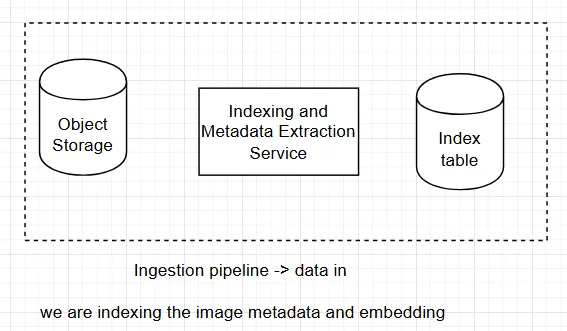
First, I need to prepare the Object Storage to keep the images I upload there.
I’m going to use S3 bucket in LocalStack to create my Blob Store. I’m preparing the environment using AWS command line to interact with the s3 buckets I will create with localstack
C:\Users\camily albres>aws --version aws-cli/1.45.56 Python/3.14.4 Windows/11 botocore/1.43.56`
I can use the aws wrapper script from localStack awslocal
==A endpoint is a entry point for an API or service to sent requests.==
Setting the Auth Token
Setting my auth token as a shell env token. If i want to use this token in a docker container, I have to inject as an env variable
LocalStack now is running as a Docker Container, emulating a AWS profile
whats the difference between a CLI setup and a Docker setup?
The difference is where LocalStack runs. The CLI is responsible for launching and managing LocalStack. It also handles configuration, networking, volumes, logs, and authentication for you.
In a Docker setup, LocalStack runs inside a container.
Setting Up the AWS CLI with LocalStack
Instead of AWS CLI talking to AWS cloud, we need to set to our local LocalStack instance
Usually, we do this by setting to the endpoint of our desired API or service
why aws CLI needs credentials?
You can configure the AWS CLI to redirect AWS API requests to LocalStack using two approaches:
Configuring and endpoint API Configuring a custom profile in AWS
$Env:AWS_PROFILE="localstack"
aws s3 mb s3://test --profile localstack
aws s3 ls --profile localstack
aws s3 rm s3://your-bucket-name/path/to/image.jpg
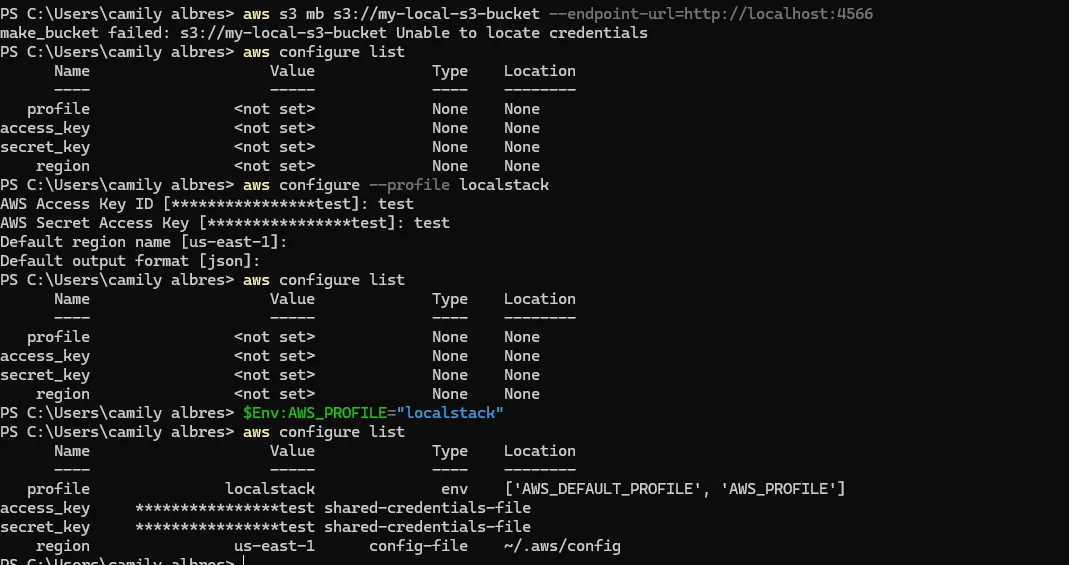
Our profile is configured in /.aws/config and /.aws/credential
Instead of passing the endpoint-url to the command, we can just use the –profile flag.
aws s3 mb s3://my-bucket --profile localstack
aws s3 ls --profile localstack
s3://my-bucket is the URI (Uniform Resource Identifier) of our object
PS C:\Users\camily albres> echo "hello from localstack" > sample.txt
PS C:\Users\camily albres> aws s3 cp sample.txt s3://my-bucket/sample.txt --profile localstack
upload: .\sample.txt to s3://my-bucket/sample.txt
Why I need a S3 client to interact with my s3 services ?
To avoid writing boilerplate code and let the client handle the aspects of communication instead of hardcoding the connection
Think of S3 as a web application running somewhere. Even when you’re using LocalStack, you’re still talking to a server that exposes the S3 API.
So your application needs something that knows how to communicate with that API. Usually, we use a SDK for this.
Boto3 is the Amazon Web Services (AWS) Software Development Kit (SDK) for Python, which allows Python developers to write software that makes use of AWS services.
how can i Deploy a application that uses SDK? i dont understand that part
import boto3

# Initialize the low-level S3 client

s3_client = boto3.client('s3',

    endpoint_url="http://localhost.localstack.cloud:4566",

    region_name="us-east-1",

    aws_access_key_id="test",

    aws_secret_access_key="test",)

# Make an API call to list all S3 buckets
response = s3_client.list_buckets()

# Print the primitive dictionary response
print(response['Buckets'])
Missing an ASGI Server Command
FastAPI Requests needs a server to host it. You must invoke your file using Uvicorn or the FastAPI CLI in your terminal.
I created the fastAPI endpoints to connect with our S3 services. See how fastAPI connects with S3 using boto3
I created the /upload, /images and /delete-image endpoints
Retrieve metadata from Key S3
aws s3api head-object --bucket <your-bucket-name> --key <path/to/your/file.ext> --profile <your-profile-name>
aws s3api head-object --bucket my-local-s3-bucket --key captured_image.png --profile localstack
I working directely with the boto3 client
For future enhancements, we can add a KV database between our client and S3 service to improve security and also the request time.
Because storing large binary images directly in a database slows performance, the web standard is to store the image file on a server folder (or cloud bucket) and save its file path/ID in the database
Image Search Indexing Service
To create our indexing service, first we need to have an EMBEDDING model to extract our features vectors and then store them in our index table.
The embedding model is the heart of our system.
When we query a system (query -time), we are putting those data into a embedding model, that will process and compare with the already existent vectors in our vector database
If we are storing a data, this data will also be inputted into our embedding model, and then will be indexed using our indexing service (index-time)
Prefect, BentoML, Qdrant
First we going to set the Qdrant vector database
docker run -p 6333:6333 -p 6334:6334 -v "$(pwd)/qdrant_storage:/qdrant/storage:z" qdrant/qdrant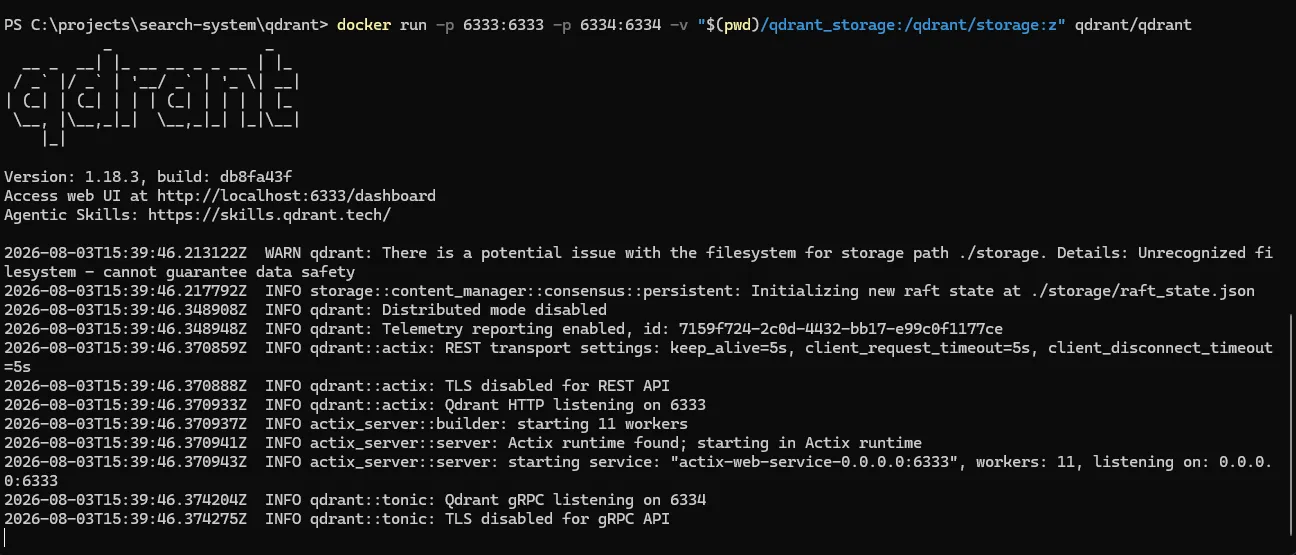
http://localhost:6333/dashboard#/welcome
They have two endpoints. One is a REST API and the other one is a GRPC API
We need to set up CLIP (CLIP (Contrastive Language–Image Pre-training). CLIP is a ViT model from OpenAI
Here, the CLIP is being used via hugging face and not ollama
With Hugging Face, my application owns the model. With Ollama, my application asks another service to run the model. Its like building our your code and running it.
using hugging face, our python runs the model locally using pyTorch. Using ollama, its other process the process the embeddings.
In this case we are loading the model into our application layer. With this, the FastAPI process is now the dedicated model server.
First we deploy the clip service as a local service instead of using Docker. Then we serve the service via a REST API like FastAPI
uvicorn clip_server:app --host 0.0.0.0 --port 8000Since our embedding model is working, we need to set the vector database. The responses we get from the clip-server, will get into our vector database Qdrant.
Setting up Qdrant
http://localhost:6333/dashboard#/collections
Setting up the Qdrant REST API We use the qdrant client for it
Create a collection upsert data points and enrich them with a custom API With a full collection, run a search to find relevant results.
@app.post("/embed/image")
async def embed_image(file: UploadFile = File(...)):
img = Image.open(io.BytesIO(await file.read()))
embedding = model.encode(img).tolist()
print(embedding)
## should I add a Qdrant client here to send the embedding to the vector database service?
return {"embedding": embedding}
Yes — right now the embedding is computed and just printed, so nothing is persisted for search. Add a Qdrant client at module level (like your s3_client), and in embed_image, upsert a point keyed to the S3 object key (so you can join back to the presigned URL later), with the embedding as the vector and payload metadata (filename, upload time, etc.).
Main tradeoff: qdrant-client’s default QdrantClient is sync, and calling it inside an async def route will block the event loop — for a low-traffic local MVP that’s fine, but if you want it non-blocking use AsyncQdrantClient instead. Also worth deciding now: collection creation (with vector size 512 for clip-ViT-B-32 and cosine distance) should happen once at startup, not on every request.
I created one endpoint for the model “/embed/image”
It send the image into the embedding model and returns a embedding vector.
When the user inputs the image, it should go the S3 service, and then to the CLIP service. After it, it should go to the index table service (Qdrant)
The users shouldn’t access the embedding service directly as a service. Only the S3 service and qdrant services should be able to do it
I’m facing a problem right now:
How do design the system workload to: Input the file Store the data into S3 Get the same data from S3 and input into the embedding service And them into the indexing service
How those components should communicate with each other? Should them be async or sync?
Well, we are building a distributed system. So how can I make the services communicate with each other the best way possible?
We can approach our problem as a event driven architecture
Or we can keep it simple and make it (synchronous, client-triggered Instead of S3 notifying anyone, your application code triggers indexing directly after the upload call returns successfully — no event system involved.
Event driven and Orchestrator are different approaches
If the workflow is created by the API calls, indepedent programs communication over HTTP requests, we can use a Orchestrator approach where one service is responsable for orchestrating the workflow
Upload Service │ ├──► S3 │ ├──► Embedding Service │ │ │ └──► Qdrant │ └──► Response to client
In other hand, if a system is too big to use a orchestrator, we can use what we call event-driven architecture
Upload Service │ ▼ Message Queue │ ▼ Embedding Worker │ ▼ Qdrant
The embedding worker listens for that event and processes the image. This is called event driven architecture and is more scalable because the upload service doesn’t have to wait for the embedding process to finish.
For our project, using a HTTP endpoint to trigger another service is the simplest and most appropriate design.
My current approach is a Orchestrator
@app.post("/upload")
async def upload_image(file: UploadFile = File(...)):
bucket, key = upload_to_s3(file)
embedding = embed_image_from_s3(bucket, key)
index_image(bucket, key, embedding)
return {"message": "Uploaded successfully!"}
Yes — /upload in main.py acts as an orchestrator: it directly calls upload_to_s3 → embed_image_from_s3 → index_image in sequence within the request handler, controlling the whole flow itself (as opposed to a choreography style where each service reacts to events without a central coordinator).
The main tradeoff: it’s simple and easy to follow, but everything runs synchronously in the request thread — a slow embedding model call or Qdrant hiccup makes the whole upload request wait (and fail as a unit, with no retry/queue). If you expect this to scale or want resilience per step, an event/queue-based pipeline (e.g. S3 upload triggers a background worker) would decouple those steps — but that’s likely overkill for where this project is right now.
OpenAPI
Second Part
Query Serving
Query serving is NOT event-driven.
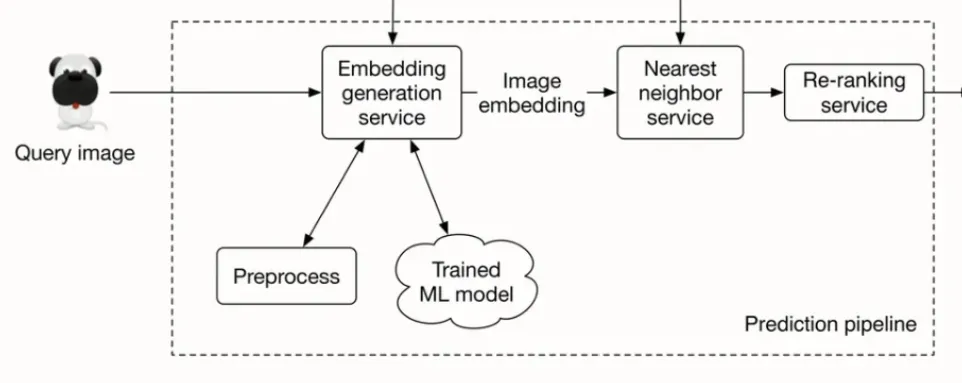
Im creating a route to call the embedding service and them call the ann_search.
The ann_search will communicate with the Qdrant server and return the vectors as payloads, so we can turn them into presigned URLs and easily fetch the correspondent images in S3
Payloads in Qdrant, is structured JSON along the vector point to store the metadata, extra information and context so we are able to filter and sort the search results.
If I delete an image in the s3, I have to delete the embeddings in Qdrant too. This is a business rule. A contract.
This is a problem related to distributed data consistency.
This is the dual-write problem: one logical operation (“delete this image”) that must land in two systems with no shared transaction
Search about transactions and heterogenous stores communication
REFATORING
batch processing to input a bunch of data
==INSIGHT - protecting user image metadata==
References
https://bytebytego.com/courses/machine-learning-system-design-interview/visual-search-system
https://skypilot.ai/blog/large-scale-vector-database#understanding-semantic-image-search
https://www.systemdesignhandbook.com/guides/google-photos-system-design/
https://medium.com/@tenyks_blogger/multi-modal-image-search-with-embeddings-vector-dbs-cee61c70a88a
https://www.systemdesignhandbook.com/guides/object-storage-system-design/